Antigravity Tricks & VS Code~editors (Cursor, Windsurf etc.)
Table of Contents
A9y = Antigravity
For simplicity, let's call Antigravity as A9y, similar to K8s for Kubernetes.
AI Tricks #
In A9y (Antigravity IDE), the AI is designed to be agentic, meaning it doesn't just suggest text but can actually execute tasks across your editor, terminal, and browser.
🆕 Enabling Sandboxing #
You can enable or disable sandboxing in Antigravity User Settings. Toggle "Enable Terminal Sandboxing" to turn sandboxing on or off. When enabled, you can also control network access separately using the "Sandbox Allow Network" toggle.
Allow List Terminal Commands #
ls
find
grep
git status
git diff
git log
git show
npm test
Enable Terminal Intellisense #
Since A9y and Cursor are forks of VS Code, they support the same Terminal IntelliSense (dropdown completions) and adds its own AI-powered terminal features.
AI Shortcuts #
Here are the top AI commands and shortcuts to master the workflow:
| Command | Action |
|---|---|
Cmd + I |
Inline AI |
Cmd + L Cmd + Shift + L |
Agent Panel/Chat open new |
Cmd + E |
Mode Switch: Quickly toggle between Fast (quick edits) and Planning (complex tasks) modes |
Tab |
Accept ghost-text suggestions |
Powerful Slash / & Context @ Commands #
In the Agent Panel, use these to refine your requests:
/test: A workflow command to automatically generate and run unit tests for the active file./review: Initiates a deep-scan of your current changes to check for bugs or DRY (Don't Repeat Yourself) violations.@YOUR_FILE: Explicitly attach specific files or folders to the AI's context window so it "sees" the relevant code.@browser: Invokes the Browser Agent to verify UI changes or scrape documentation.
Agent Rules .agent/rules/ #
You can automate your own "commands" by adding .md files to the .agent/rules/ directory. For example, a rule saying "Always use TypeScript strict mode" acts as a permanent background command that the AI follows without you having to ask every time.
How to configure A9y AI globally to always prefer git mv for moving/renaming files? #
- Open A9y and press
Cmd + Shift + P(orCtrl + Shift + P). - Search for "Antigravity: Open User Customizations".
- In the
Global Instructionstext area, append:"Preference: Always use 'git mv' for file relocations and renames." - Save and restart your session.
Keeping Focus #
| Command | Description |
|---|---|
Cmd + B |
toggle left sidebar |
Opt + Z |
toggle word wrap (useful in side-by-side diffs, markdown tables, ...) |
🥷 Better Zen Mode (inspired by Zed) #
- Override
View: Toggle Zen Modeshortcut to:Shift + Esc - Turn Full Screen OFF: A9y magic link
- Turn Center Layout OFF: A9y magic link
- Unhide line numbers: A9y magic link
Done! Now you can quickly toggle Zen Mode with Shift + Esc w/o fullscreen and empty panels friction.
Terminal Commands #
| Command | Description |
|---|---|
Cmd + J |
toggle terminal |
Ctrl + Opt + R |
loop through recent commands |
clear |
clear terminal |
exit |
kill/close terminal |
agy <path> |
open file/folder in A9y (install: Shell Command: Install 'agy' command in PATH) |
Editing Tricks #
| Command | Description |
|---|---|
Opt + Up/Down |
move code |
Shift + Opt + Up/Down |
duplicate code |
Shift + Cmd + V |
open Markdown Preview |
Cmd + P |
jump to file |
Shift + Opt + I |
activate multi-line cursor |
Auto-formatting with Prettier #
- 🧩 Install
/prettier/prettier-vscode
- ⚙️ Set it as default formatter:
Examples:
/tricks/njk-liquid/#auto-formatting-in-vs-code~editors for
.njk/.liquid
Open Markdown Previews to the Side #
By default Shift + Cmd + V opens preview in the same editor pane (which is annoying).
But you can re-map it to Markdown: Open Preview to the Side shortcut instead.
Other Tricks #
Comparing two files (diffing) #
In A9y, comparing two files (Diffing) is straightforward and can be handled via the UI or the integrated terminal.
Using the UI (Side Bar):
- Open the Explorer view in the left sidebar.
- Right-click the first file and select Select for Compare.
- Right-click the second file and select Compare with Selected.
- A side-by-side diff editor will open, highlighting additions (green) and deletions (red).
Using the Command Line:
agy --diff FILE1 FILE2
Hide files, folders, symlinks #
{
  "files.exclude": {
    "YOUR_FILE_OR_FOLDER": true
  },
  "search.followSymlinks": false
}
The A9y Easter Eggs #
If you have Python installed, you can trigger this feature by typing the following into your terminal:
python3 -c "import antigravity"
Running this command opens your web browser to the classic XKCD comic #353, which depicts a programmer flying because Python is so easy to use:

The Egg inside the Egg #
The antigravity module is a famous Python "Easter egg." While most people know it for opening the XKCD "Python" comic in your browser when imported, it contains a second "egg inside the egg": a functional implementation of the Munroe Algorithm (Geohashing).
How it Works: The algorithm, described in XKCD #426, generates a set of random coordinates for every area (graticule) on Earth each day. To ensure the locations are unpredictable until the day of, the algorithm uses the most recent Dow Jones Industrial Average opening price as a "salt" for the hash.
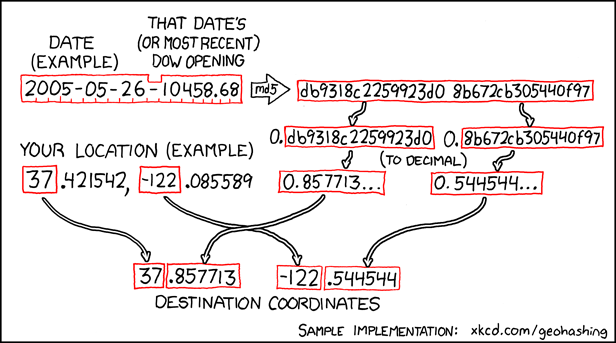
It has been included in the CPython standard library since version 2.7 and 3.1.
But Why? The original idea was to encourage people to get outside and meet at a random, algorithmically-generated spot in their local area.